
How to Build a Claude MCP Server for Google Search Console
Most SEOs interact with Google Search Console the same way: log in, click around, export a CSV, paste it into a spreadsheet, and try to remember what you were looking for. It works, but it's slow — and it puts a dashboard between you and your data at every step.
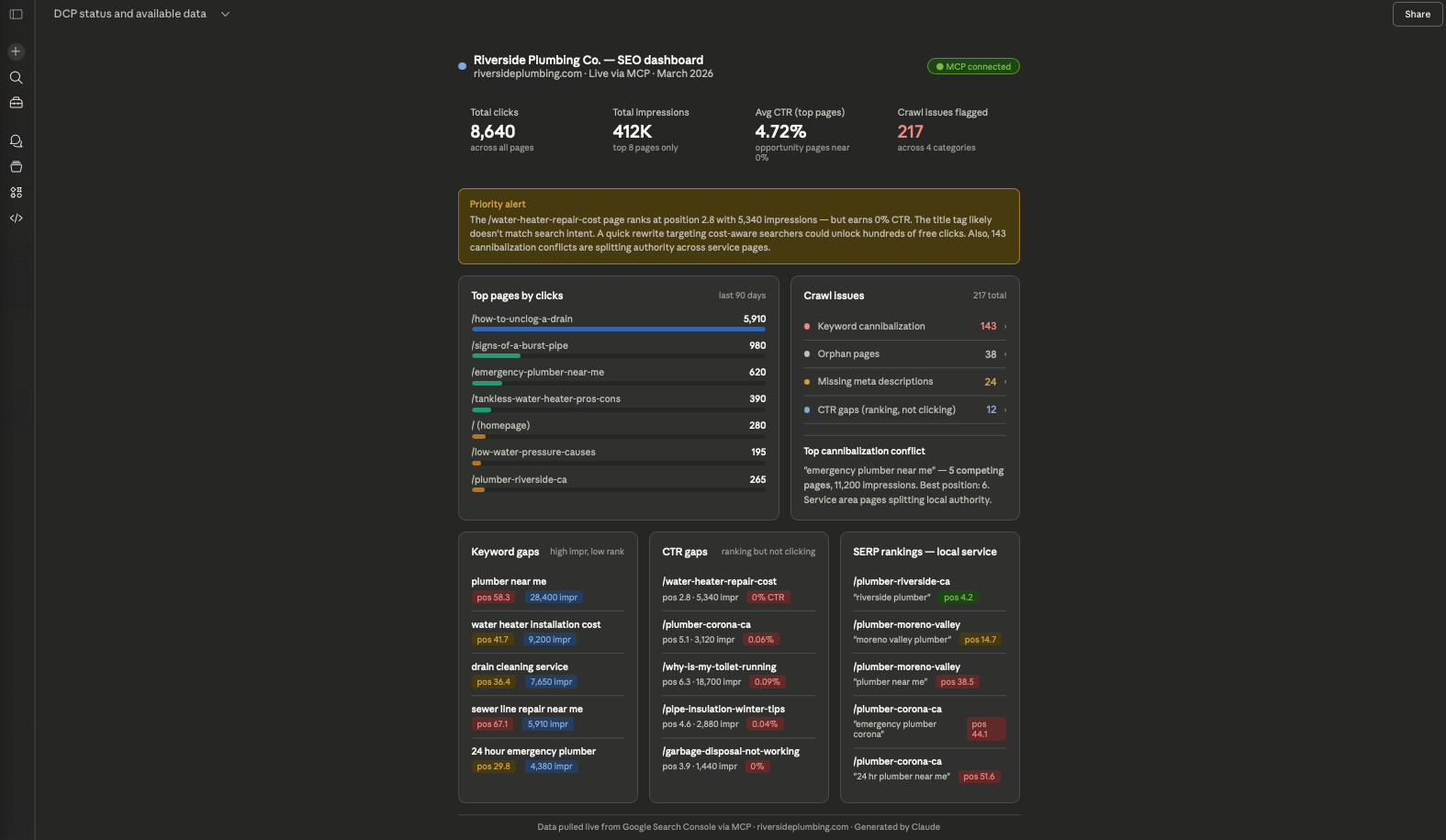
This tutorial walks through how to build a system that removes that friction entirely. By the end, you'll have Claude connected directly to your GSC data through a custom MCP server, so you can ask plain English questions — "What are my top keyword gaps?" or "Which pages have high impressions but terrible CTR?" — and get answers pulled live from your own database, no dashboard required.
This is the exact setup we built for Salt Creative, our full-service web design and digital marketing agency. The stack is free to run (Oracle Cloud Free Tier + open source Python), and the same pattern scales to any number of clients.
Here's what we're building:
A Python based data pipeline pulls GSC data and crawl metrics into a local DuckDB database. A FastMCP server wraps that database and exposes it as tools Claude can call. An ngrok tunnel makes the server reachable over HTTPS so Claude.ai can connect to it. The result is a live, queryable SEO intelligence layer that lives in your Claude conversation.
Setting up the Infrastructure (Oracle Cloud & DuckDB)
The entire system runs on a single Oracle Cloud Free Tier VM — permanently free, no credit card required after signup.
Provision the VM
In the Oracle Cloud Console, create a Compute instance with the following specs:
- Image: Oracle Linux 9
- Shape: VM.Standard.E2.1.Micro (1 OCPU, 1 GB RAM)
- Region: any Always Free-eligible region
Download your SSH key during setup and note your instance's public IP address. You'll use both throughout this build.
To connect from your terminal:
ssh -i ~/path/to/your-ssh-key.key opc@YOUR.SERVER.IP.ADDRESS
Note: Oracle Linux uses dnf (not apt) and firewall-cmd (not ufw). The default SSH username is opc.
One important firewall note: Oracle Cloud has two firewall layers — the OS-level (`firewall-cmd` ) and the VCN Security List in the Console. You'll need both open for SSH (port 22) and for the MCP server (port 8000) to be reachable. If SSH suddenly stops working after a reboot, it's usually because `(firewall-cmd` ) didn't persist the SSH service rule. Fix it permanently with:
 sudo firewall-cmd --permanent --add-service=ssh
 sudo firewall-cmd --permanent --add-port=8000/tcp
 sudo firewall-cmd --reload
Also add an ingress rule in the Oracle Console under Networking → Virtual Cloud Networks → your VCN → Security Lists → Default Security List, allowing TCP traffic on port 8000 from `0.0.0.0/0`.
Set up the project structure
 mkdir -p ~/seo-intelligence/{clients/your-client/data/db,collectors,processors,dashboard,config,scheduler}
cd ~/seo-intelligence
The client folder pattern is intentional — each client gets its own client.yaml config and its own DuckDB file, so adding a new client later is just a folder copy and a config edit.
Install Python 3.11 via Miniconda
The MCP libraries (fastmcp) require Python 3.10+. Oracle Linux 9's system Python is 3.9, so install Miniconda to manage a parallel 3.11 environment without touching the system Python:
 wget https://repo.anaconda.com/miniconda/Miniconda3-latest-Linux-x86_64.sh
bash Miniconda3-latest-Linux-x86_64.sh -b -p ~/miniconda3
~/miniconda3/bin/conda init bash
source ~/.bashrc
conda tos accept --override-channels --channel defaults
conda tos accept --override-channels --channel conda-forge
conda create -n py311 python=3.11 -y
conda activate py311
Install dependencies
 pip install fastmcp duckdb pandas pyyaml requests \
            google-api-python-client google-auth-oauthlib \
            advertools sentence-transformers plotly streamlit
On a 1 GB RAM VM, sentence-transformers should be loaded lazily — don't import it at module level. Load it only when the scoring functions are actually called.
DuckDB: why a single file database
DuckDB is the right storage choice here because it's columnar (fast on analytical queries like aggregating 300K keyword rows), requires zero server setup, and lives as a single portable file. Every client gets their own .duckdb file at clients/your-client/data/db/your-client.duckdb.
One limitation to know upfront: DuckDB only allows one writer at a time. When the MCP server is running with a read connection open, your data collectors can't write to the same file simultaneously. The fix is to stop the MCP server before running a data pull, then restart it after. This is handled in the collector scripts.
Data Collection (The GSC and SERP Scrapers)
Google Search Console OAuth
GSC data is the foundation. You'll pull 90 days of query, page, and combined query+page data into DuckDB via the GSC API.
First, create OAuth credentials in Google Cloud Console:
- Go to console.cloud.google.com → APIs & Services → Credentials
- Create an OAuth 2.0 Client ID (Desktop App type)
- Download the JSON credentials file — save it as config/gsc_credentials.json
- Under OAuth Consent Screen, set publishing status to Testing and add your Google account as a test user
Run the one time auth flow locally (on your Mac, not the server) to generate a token:
 pip install google-auth-oauthlib google-api-python-client
python auth_gsc.py
# A browser window opens → log in with the account that has GSC access → token saved
This generates config/gsc_token.json. Copy both the credentials and token files to the server:
 scp -i ~/path/to/your-ssh-key.key config/gsc_credentials.json config/gsc_token.json \
    opc@YOUR.SERVER.IP.ADDRESS:~/seo-intelligence/config/
The gsc_pull.py collector reads both files and makes direct HTTP requests to the GSC API (avoiding the googleapiclient discovery doc, which can hang on some environments). It pulls three tables into DuckDB:
- gsc_query_page — every query+URL combination with clicks, impressions, CTR, and position
- gsc_pages — page-level aggregates
- gsc_queries — query-level aggregates
Run the initial 90-day pull:
 cd ~/seo-intelligence && conda activate py311
python collectors/gsc_pull.py --client your-client --days 90
A healthy pull for a mid size site will typically return 300,000+ rows across the three tables.
Site crawl and issue detection
site_crawl.py uses advertools to crawl the site via its sitemap and write page-level metadata (title, meta description, H1, canonical, status code, word count) to DuckDB.
python collectors/site_crawl.py --client your-client --sitemap https://yourdomain.com/sitemap.xml
flag_issues.py then runs four detection passes against the crawl + GSC data:
- Keyword cannibalization — multiple pages ranking for the same query
- Orphan pages — pages with zero GSC impressions and no internal links pointing to them
- CTR gaps — pages with high impressions but CTR significantly below the position average
- Missing or thin meta — pages without title tags or meta descriptions under a minimum word count threshold
All issue rows are written to their own DuckDB tables (cannibalization_issues, orphan_pages, ctr_gaps, missing_meta) so the MCP server can query them independently.
SERP rank tracking
serp_scrape.py handles live SERP position tracking. One important reality: Google blocks requests from cloud datacenter IPs, so direct scraping from an Oracle VM will return blocked results. The collector handles this with a dual-mode approach — it uses the SerpAPI service if a SERP_API_KEY environment variable is set, and falls back to direct requests otherwise (logging the blocked status).
SerpAPI's free tier gives 100 searches/month, which is enough for weekly tracking across 20 target keywords.
 export SERP_API_KEY=your_serpapi_key_here
python collectors/serp_scrape.py --client your-client
Because DuckDB can't be written to while the MCP server holds a connection, the scraper stops the MCP server before writing results and restarts it after. This is handled automatically inside the script.
client.yaml schema
Each client is configured via a YAML file that all collectors read:
 client_name: Your Client Name
domain: yourdomain.com
gsc_property: sc-domain:yourdomain.com
db_path: clients/your-client/data/db/your-client.duckdb
target_markets:
  - City 1
  - City 2
competitors:
  - competitor1.com
  - competitor2.com
tracked_keywords:
  - keyword one
  - keyword two
The Intelligence Layer (Semantic Scoring & Info Gain with Claude)
This is where the system pulls ahead of standard GSC dashboards. Two custom metrics — semantic backlink relevance and Information Gain score — give you signals that no off-the-shelf tool surfaces.
Semantic backlink relevance (score_semantic.py)
Standard backlink metrics tell you domain authority. They don't tell you whether the linking page is topically related to the page being linked to. That's what score_semantic.py does.
It uses sentence-transformers (specifically the all-MiniLM-L6-v2 model) to generate embeddings for both the linking page content and the target page content, then computes cosine similarity. The result is a relevance score between 0 and 1 stored alongside each backlink in DuckDB.
 from sentence_transformers import SentenceTransformer, util
# Load lazily — only when scoring actually runs
model = SentenceTransformer('all-MiniLM-L6-v2')
def score_backlink_relevance(source_text: str, target_text: str) -> float:
    embeddings = model.encode([source_text, target_text])
    return float(util.cos_sim(embeddings[0], embeddings[1]))
On a 1 GB VM, load the model once per scoring run and process all backlinks in a single pass rather than loading it per URL.
Information Gain score (score_info_gain.py)
The Information Gain score answers the question: does this page add anything that the top 10 results don't already cover?
The approach: fetch the top 10 SERP results for a target keyword, extract their text, build a TF-IDF representation of the combined corpus, then compare your page's TF-IDF vector against it. The delta — terms your page uses that are absent or underrepresented in the top 10 — is your Information Gain score.
Pages scoring below a threshold (typically 0.3) are flagged for content expansion. The /resources/ section of a content-heavy site is usually where you'll find the most actionable gaps.
 from sklearn.feature_extraction.text import TfidfVectorizer
from sklearn.metrics.pairwise import cosine_similarity
import numpy as np
def compute_info_gain(page_text: str, competitor_texts: list[str]) -> float:
    corpus = competitor_texts + [page_text]
    vectorizer = TfidfVectorizer(stop_words='english')
    tfidf_matrix = vectorizer.fit_transform(corpus)
    competitor_centroid = np.mean(tfidf_matrix[:-1].toarray(), axis=0)
    page_vector = tfidf_matrix[-1].toarray()[0]
    # Info gain = how different your page is from the competitor average
    similarity = cosine_similarity([page_vector], [competitor_centroid])[0][0]
    return round(1 - similarity, 4)
Scores for all tracked pages are written to an info_gain_scores table in DuckDB and are directly queryable through the MCP server.
Exposing Data to Claude via MCP
With data flowing into DuckDB, the final step is wrapping it in an MCP server so Claude can query it in natural language.
Writing the MCP server
seo_mcp_server.py uses FastMCP to define tools that Claude can discover and call. Each tool is a Python function decorated with @mcp.tool() that runs a DuckDB query and returns a formatted result:
 from fastmcp import FastMCP
import duckdb
import yaml
mcp = FastMCP("SEO Intelligence")
def get_db(client: str) -> duckdb.DuckDBPyConnection:
    from pathlib import Path
    base = Path("clients").resolve()
    config_path = (base / client / "client.yaml").resolve()
    if not str(config_path).startswith(str(base)):
        raise ValueError("Invalid client path")
    config = yaml.safe_load(open(config_path))
    return duckdb.connect(config["db_path"], read_only=True)
@mcp.tool()
def get_keyword_gaps(client: str, min_impressions: int = 100) -> str:
    """Return queries with high impressions but weak CTR or position."""
    con = get_db(client)
    result = con.execute("""
        SELECT query, SUM(impressions) as impressions,
               AVG(position) as avg_position, AVG(ctr) as avg_ctr
        FROM gsc_queries
        GROUP BY query
        HAVING SUM(impressions) >= ?
           AND (AVG(position) > 15 OR AVG(ctr) < 0.03)
        ORDER BY impressions DESC
        LIMIT 25
    """, [min_impressions]).df()
    return result.to_markdown(index=False)
@mcp.tool()
def get_crawl_issues(client: str) -> str:
    """Return a summary of detected SEO issues: cannibalization, orphans, CTR gaps, missing meta."""
    con = get_db(client)
    summary = {}
    for table in ["cannibalization_issues", "orphan_pages", "ctr_gaps", "missing_meta"]:
        try:
            count = con.execute(f"SELECT COUNT(*) FROM {table}").fetchone()[0]
            summary[table] = count
        except Exception:
            summary[table] = 0
    return str(summary)
@mcp.tool()
def get_top_pages(client: str, metric: str = "clicks", limit: int = 20) -> str:
    """Return top pages ranked by a GSC metric (clicks, impressions, ctr, position)."""
    allowed_metrics = {"clicks": "clicks", "impressions": "impressions",
                       "ctr": "avg_ctr", "position": "avg_position"}
    if metric not in allowed_metrics:
        return f"Invalid metric '{metric}'. Choose from: {', '.join(sorted(allowed_metrics))}"
    col = allowed_metrics[metric]
    con = get_db(client)
    result = con.execute(f"""
        SELECT page, SUM(clicks) as clicks, SUM(impressions) as impressions,
               AVG(ctr) as avg_ctr, AVG(position) as avg_position
        FROM gsc_pages
        GROUP BY page
        ORDER BY {col} DESC
        LIMIT ?
    """, [limit]).df()
    return result.to_markdown(index=False)
@mcp.tool()
def get_serp_rankings(client: str, keyword: str) -> str:
    """Return current SERP position data for a keyword."""
    con = get_db(client)
    result = con.execute("""
        SELECT keyword, our_position, our_url, scraped_at, blocked
        FROM serp_rankings
        WHERE keyword LIKE ?
        ORDER BY scraped_at DESC
        LIMIT 10
    """, [f"%{keyword}%"]).df()
    return result.to_markdown(index=False)
@mcp.tool()
def get_info_gain_scores(client: str, threshold: float = 0.3) -> str:
    """Return pages with Information Gain scores below the target threshold."""
    con = get_db(client)
    result = con.execute("""
        SELECT page_url, keyword, info_gain_score, scored_at
        FROM info_gain_scores
        WHERE info_gain_score < ?
        ORDER BY info_gain_score ASC
        LIMIT 20
    """, [threshold]).df()
    return result.to_markdown(index=False)
@mcp.tool()
def switch_client(client_name: str) -> str:
    """Switch the active client context."""
    import os
    os.environ["ACTIVE_CLIENT"] = client_name
    return f"Switched active client to: {client_name}"
if __name__ == "__main__":
    mcp.run(transport="streamable-http", port=8000)
Starting the server
 conda activate py311
nohup python seo_mcp_server.py > server.log 2>&1 &
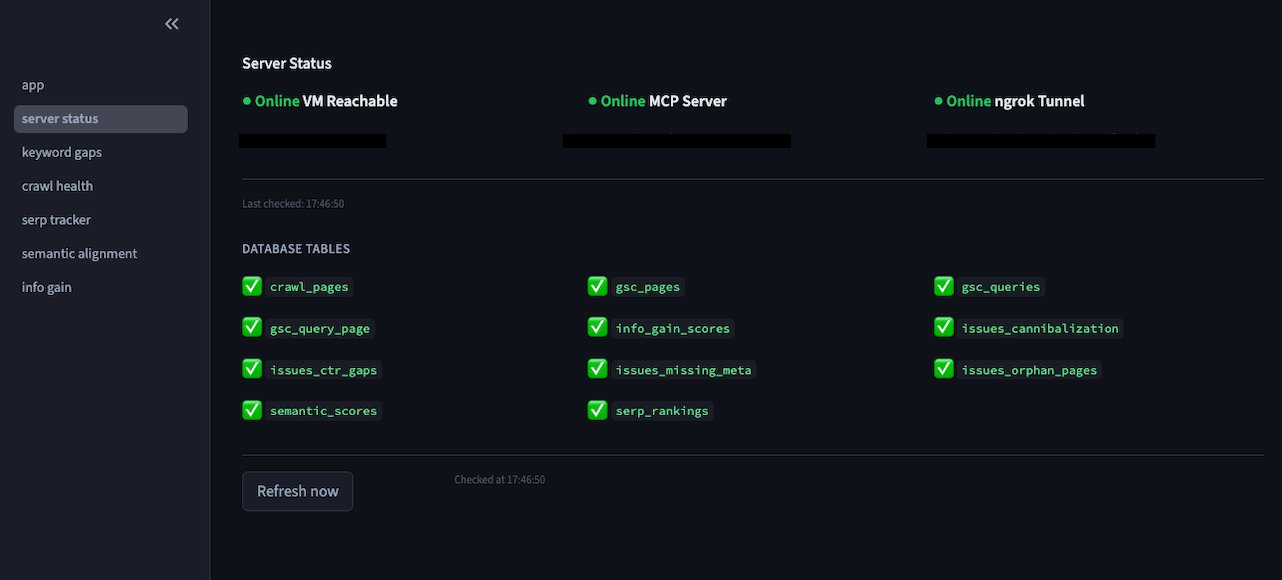
The server runs on port 8000. Confirm it's live:
curl http://localhost:8000/mcp
Exposing it over HTTPS with ngrok
Claude.ai requires HTTPS for MCP connections. The simplest solution is ngrok, which creates a secure tunnel from a public HTTPS URL to your server's port 8000.
- Sign up at ngrok.com (free tier is sufficient)
- Verify your email when prompted
- Copy your authtoken from the ngrok dashboard
- On the server:
 curl -s https://ngrok-agent.s3.amazonaws.com/ngrok.asc | sudo tee /etc/yum.repos.d/ngrok.repo
sudo dnf install ngrok -y
ngrok config add-authtoken YOUR_NGROK_AUTHTOKEN_HERE
nohup ngrok http 8000 > ngrok.log 2>&1 &
5. Get your public URL:
 curl -s http://localhost:4040/api/tunnels | python3 -c \
  "import sys,json; print(json.load(sys.stdin)['tunnels'][0]['public_url'])"
You'll get a URL like https://your-subdomain.ngrok-free.dev. Append /mcp to this — that's your connector URL.
Connecting to Claude.ai
In the browser version of Claude.ai (the Mac app doesn't support MCP connectors):
- Settings → Connectors → Add custom connector
- Enter: https://your-subdomain.ngrok-free.dev/mcp
- Click Connect
Claude will detect the available tools automatically. You'll see them listed under the connector in Settings.
Keeping the server alive
A few things to keep running persistently on the server. Use a simple startup script or add these to cron (@reboot):
 # Start MCP server
conda activate py311 && nohup python ~/seo-intelligence/seo_mcp_server.py > ~/seo-intelligence/server.log 2>&1 &
# Start ngrok tunnel
nohup ngrok http 8000 > ~/ngrok.log 2>&1 &
Note that ngrok free tier tunnels generate a new subdomain each time they start. If you restart ngrok, you'll need to update the connector URL in Claude.ai. A paid ngrok plan gives you a stable custom subdomain.
Querying your data in Claude
Once connected, open a conversation in Claude.ai and try:
- "What are the top keyword gaps for [your client] with at least 500 impressions?"
- "Show me the crawl issues — how many pages have cannibalization problems?"
- "What are the top 10 pages by clicks?"
- "Which pages have Information Gain scores below 0.3?"
- "What's the current SERP ranking for 'web design [city]'?"
Claude calls the appropriate tool, runs the DuckDB query, and returns a formatted table with analysis. No CSV exports, no dashboard navigation, no context-switching.
Scaling to multiple clients
Adding a new client is a three step process:
 cp -r clients/your-client clients/new-client
# Edit clients/new-client/client.yaml with the new domain, keywords, and GSC property
python collectors/gsc_pull.py --client new-client --days 90
The switch_client tool lets you swap the active context mid-conversation: "Switch to new-client, then show me their keyword gaps." Each client's data stays isolated in its own DuckDB file.
What's Next
This tutorial covers Phase 1: infrastructure, GSC data collection, issue detection, and MCP connectivity. Phase 2 adds the full intelligence layer:
score_semantic.py — Sentence-Transformers cosine similarity scoring for every backlink, giving you topical relevance instead of just domain authority.
score_info_gain.py — TF-IDF comparison against live SERP results, flagging pages where competitors are covering topics your content misses.
scheduler/run_weekly.py — a cron-orchestrated pipeline that runs collect → process → update DB every Sunday night so your Claude conversations always start from fresh data.
The combination of live GSC data, crawl health signals, and proprietary scoring — all queryable in natural language — is the kind of setup that took a few hours to build and replaced tools costing hundreds of dollars a month.